YOUR CATALOG. YOUR TIME TO UNWIND.

Make tonight
a movie night.

Browse movies and series, tune into supported live-TV channels, and keep your progress together in one focused app for your ISP media catalog.

Available for Windows & LinuxNo account required
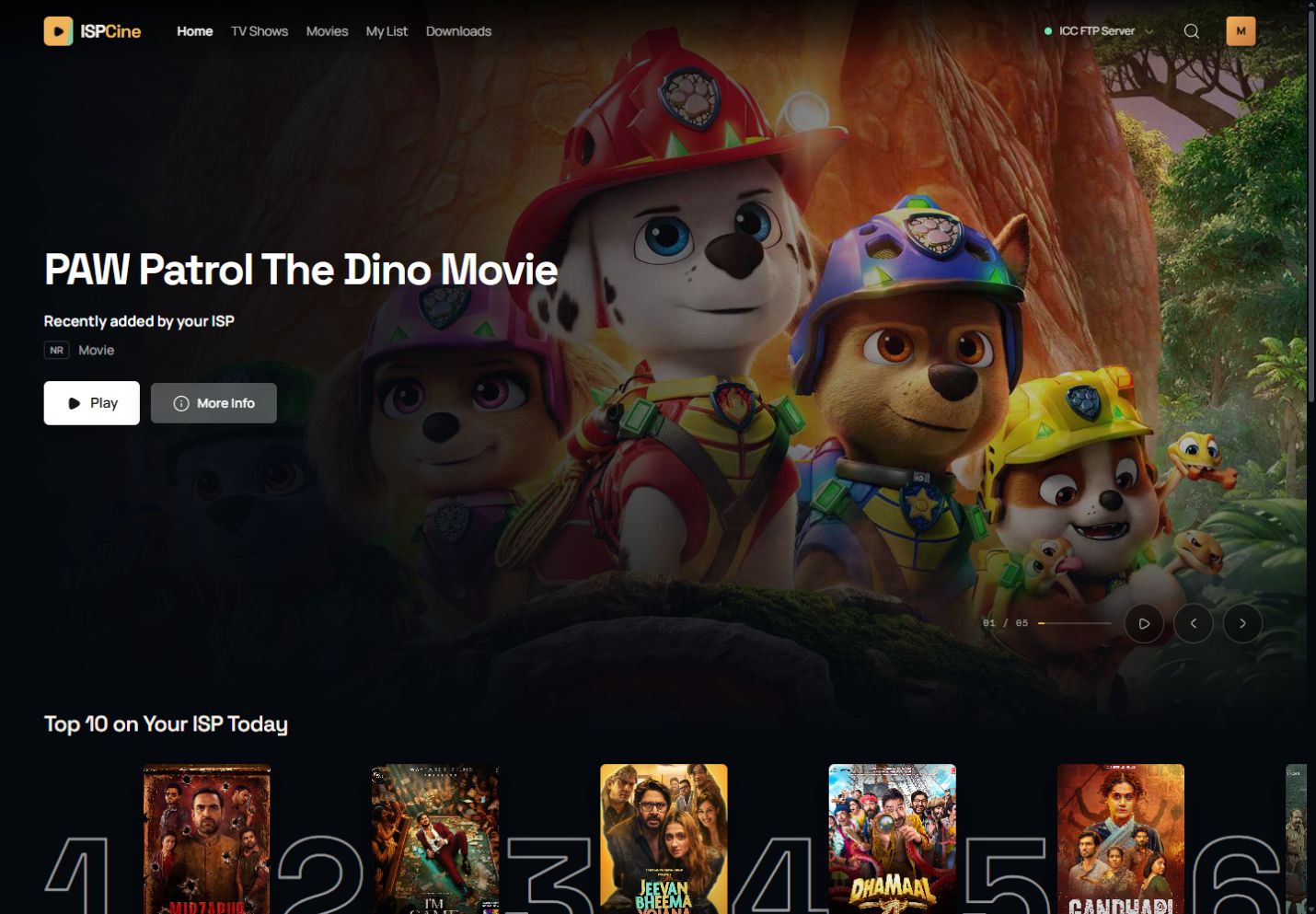
ISPCine / Your private screening roomDESKTOP APP
ISPCine desktop app showing a featured movie, My List, and titles available from an ISP catalog
The catalog you already have. The movie night you look forward to.
Direct downloadsNo account requiredLocal-first library

MADE FOR MOVIE NIGHTS

Less searching.
More watching.

Spend your evening enjoying a story. Keep the finding, saving, and picking up again in one familiar place.

01

Find your next favorite.

Skip the hunt through portal pages. Browse movies and series, search for a title, and see the details before you choose.

02

Your place is saved.

Life interrupts. Your story can wait. Resume where you stopped, move to the next episode, or save a discovery to My List.

03

Keep a good watch ready.

Found a title for later? Download it from your supported provider and see what’s ready in one place.

04

Start without signing up.

Open the app and make it yours. Without sign-in, your list, watch history, and progress stay on your device.

SETTLE INTO THE STORY

Get comfortable.
Stay in the story.

Missed a line? Jump back. Prefer subtitles? Turn them on. Adjust the speed or go fullscreen, with the controls you need close at hand.
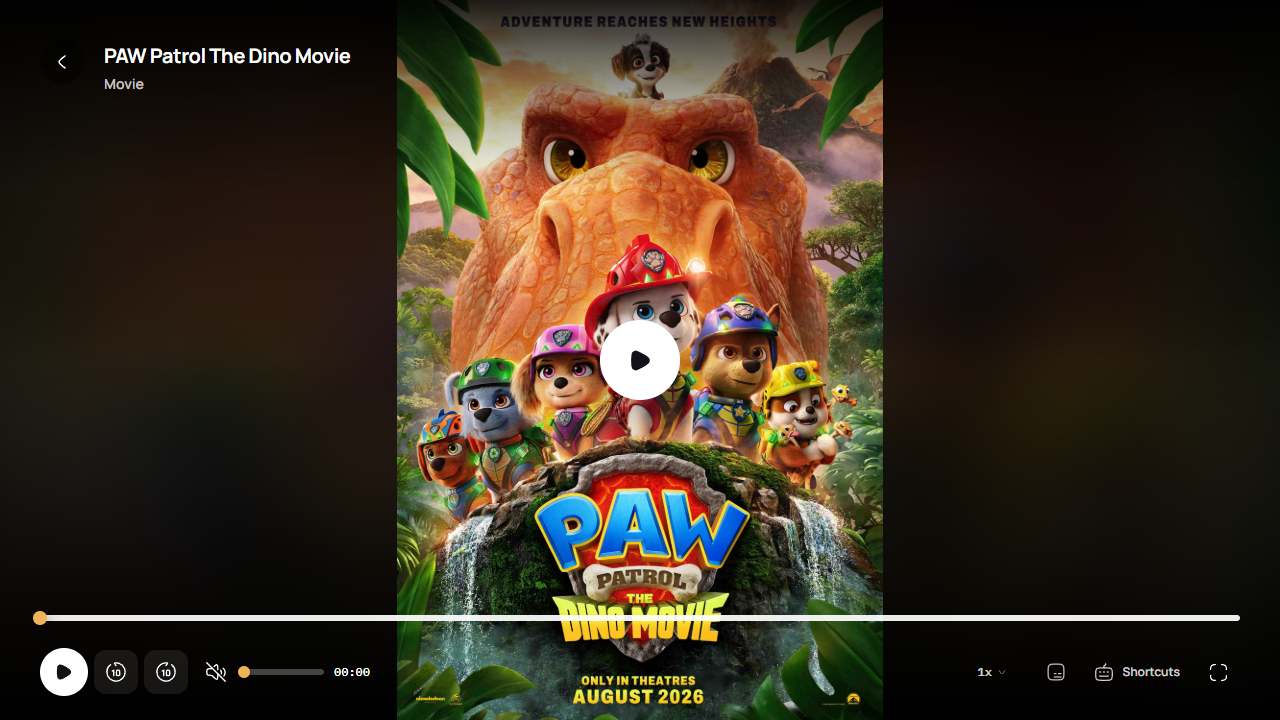
SubtitlesPlayback speedEpisode navigation
ISPCine player showing title artwork, playback controls, seeking, volume, speed, subtitles, and fullscreen
Your viewing preferences. Your pace.

ONE APP. MORE OF YOUR NETWORK.

See what your ISP
already gives you.

ISPCine checks which supported media services are reachable from your current network, then brings their different catalogs into one familiar place.

Live TV, right beside your catalog.

Watch channels made available by your provider without switching to another site. Channel lineups depend on your provider and network.

NETWORK CHECKSupported services
CineplexBD
RoyalFlix
ICC FTP Server
IBCCL FTP
Media Server
MultiMovies
Availability varies by ISP and location.Request a provider

FROM INSTALL TO PLAY

Your next movie night,
three steps away.

No account needed to begin. Bring your Windows or Linux computer and access to a supported ISP catalog.

  1. 01

    Get the app.

    Choose your installer below. Download directly and install ISPCine on your computer.

  2. 02

    Find what’s available.

    ISPCine checks which supported providers can be reached from your current network. Choose one that is available.

  3. 03

    Make time for a story.

    Pick a movie, start a series, tune into live TV, or save something for tomorrow. Your next watch starts here.

MAKE ROOM FOR MOVIE NIGHT

Give your movie nights an upgrade.

Choose a version and download format. Explore your supported ISP catalog without creating an account.

RELEASE ARCHIVE · 14 VERSIONS

Every ISPCine release

Read what changed and download the version that fits your computer. The newest release is recommended.

ISPCine 0.0.50Latest

ISPCine 0.0.50 includes 35 user-visible changes since v0.0.49.

What's new

  • Make home shelves mutually unique.
  • Paginate every media rail.
  • Expand featured carousel.
  • Add shared carousel steps.
  • Show active download speed.
  • Add download management controls.
  • Show full provider readiness list.
  • Add genre rails to home prototype.
  • Add movies rail to home prototype.
  • Add conditional movie download action.
  • Add season and episode download controls.
  • Complete searchable provider chooser prototype.
  • Populate live TV prototype with real channels.
  • Build complete interactive UI prototype.
  • Add contextual icons to empty states.
  • Add account-wide app issue reporting.
  • Refine sign-in and account interactions.
  • Improve desktop lifecycle and fallback screens.

Fixes

  • Dismiss media previews while scrolling.

Other improvements

  • Add Microsoft Store MSIX release build.
  • Allow desktop download folder changes.
  • Expand live TV catalog and browsing.
  • Align player controls and playback dialogs.
  • Simplify provider and offline management.
  • Rebuild discovery and catalog surfaces.
  • Align application shell and utility routes.
  • Document prototype redesign system.
  • Add global provider switching state.
  • Reuse empty state at catalog end.
  • Rename homepage series rail.
  • Add anime rail to homepage.
  • Add infinite catalog loading to browse and search.
  • Extend genre browser to anime catalog.
  • Add scalable genre browser to catalog pages.
  • Remove custom provider controls.
ISPCine 0.0.49

ISPCine 0.0.49 adds in-app playback issue reporting and improves provider and playback reliability.

What's new

  • Report playback problems directly from movie, series, anime, and Live TV players with diagnostic details attached automatically.
  • Track submitted reports and their status from the new Your Reports page.
  • Review reports, occurrence history, diagnostics, and investigation status from the administration dashboard.
  • Check provider availability manually when troubleshooting catalog access.

Fixes

  • Improved subtitle loading and CTG playback recovery.
  • Preserved the selected mute state when playback recovers.
  • Started CTG streams through managed playback sessions for more reliable switching.
  • Restored missing releases in the download archive.
ISPCine 0.0.48

ISPCine 0.0.48 improves the reliability of automatic updates on Windows.

Fixes

  • Install Windows updates silently and relaunch ISPCine automatically after installation.
  • Write updater diagnostics to the application data folder to make future installation failures easier to identify.
ISPCine 0.0.47

ISPCine 0.0.47 adds CTG Hall and CTG Stream, richer provider discovery, and clearer playback quality information.

What's new

  • Browse, search, and watch CTG Hall movies, series, and anime, with progressive downloads where available.
  • Browse and stream CTG Stream movies, series, and anime through its public Jellyfin profile, with subtitles and WebView-compatible HLS playback.
  • Browse normalized provider and genre shelves with automatic availability refresh and clearer discovery progress.
  • See detected and available video resolutions throughout previews and playback.
  • Browse the complete release archive and current desktop downloads on the landing site.

Fixes

  • Fixed CTG Stream switching and support for its short numeric library and media IDs.
  • Preserved provider artwork, partial ICC catalogs, page scrolling, and fallback Live TV artwork.
  • Prevented player controls from acting before media is ready.
ISPCine 0.0.46

ISPCine 0.0.46 adds important in-app notices for provider updates and other announcements.

What's new

  • Receive important provider updates and other announcements directly in the app.
ISPCine 0.0.45

ISPCine 0.0.45 expands the catalog with KhulnaPlex and anime, and improves browsing and desktop reliability.

What's new

  • Added KhulnaPlex as a supported provider.
  • Added a provider-backed anime catalog.
  • Added a movie rail to the home page.
  • Numbered provider selector options for easier navigation.

Fixes

  • Hardened Linux window startup.
  • Preserved the player origin and protected downloads.
  • Corrected platform package scripts in CI.
ISPCine 0.0.44

ISPCine 0.0.44 adds desktop update notifications, easier browsing controls, more reliable downloads, and expanded provider access.

What's new

  • Desktop installations can detect, download, and offer to install newer releases.
  • Live TV categories and long provider selectors are now searchable.
  • CTG Movies is now available as an integrated content provider.

Fixes

  • Artwork and movie downloads recover more reliably when an upstream source is unavailable.
  • Opening and closing menus no longer causes unexpected page scrolling.
ISPCine 0.0.43

Live TV and playback are more resilient, with adaptive quality controls and clearer release information.

What's new

  • Choose adaptive stream quality and keep the preference across playback sessions.
  • Watch more Live TV channels from the curated JoyBD lineup.
  • See concise release notes beside desktop downloads.

Playback improvements

  • Playback recovers across alternate channel streams and provider sources.
  • Live channel updates refresh without disrupting the current category filter.
  • Loading feedback remains visible until video is ready.
ISPCine 0.0.42

Live TV playback arrives alongside a portable AppImage for 64-bit Linux.

What's new

  • Browse and watch Live TV with channel health detection and automatic stream handling.
  • Use the new portable AppImage on 64-bit Linux distributions.
  • Download Debian, AppImage, and Windows packages from the same release.
ISPCine 0.0.41

This release adds grouped search across every available provider and improves provider startup and configuration.

Improvements

  • Search every reachable provider from one dialog.
  • Group global search results by provider and preserve partial results when a provider fails.
  • Retry and paginate each provider group independently.
  • Add compatible custom provider addresses when defaults are unavailable.
ISPCine 0.0.4

This release improves first-run catalog recovery when a network does not expose a default provider.

These early packages are stored in the private GitHub repository and require repository access.

Improvements

  • Retry an initially unavailable catalog after the private desktop server starts.
  • Show a clear unsupported-network state with Network Check and retry actions.
  • Allow custom server addresses compatible with existing provider adapters.
  • Persist custom provider connections locally.
ISPCine 0.0.3

This maintenance release restores Google sign-in on Windows and Ubuntu/Linux.

These early packages are stored in the private GitHub repository and require repository access.

Fixes

  • Keep the deployed account API in desktop builds.
  • Register the ispcine:// protocol on Windows and Debian.
  • Route OAuth callbacks to the private loopback application server.
  • Store completed sign-in handoffs with Electron secure storage.
ISPCine 0.0.2

This release makes ISPCine clearer and easier to recover when content is unavailable.

These early packages are stored in the private GitHub repository and require repository access.

Improvements

  • Add friendlier offline, empty, loading, not-found, and error states.
  • Add context-specific recovery actions throughout the catalog and player.
  • Improve playback controls, keyboard guidance, and accessible error recovery.
  • Explain connection problems without exposing technical errors.
ISPCine 0.0.1

The first public desktop release of ISPCine for Windows and Ubuntu/Debian.

These early packages are stored in the private GitHub repository and require repository access.

Highlights

  • Browse, search, and play an ISP catalog across Home, Movies, Series, My List, and History.
  • Resume playback, use fullscreen, navigate episodes, and manage subtitles.
  • Run in a native Electron shell with loopback-only services and local storage.

Requires access to a supported ISP media catalog. ISPCine is in active early development, so provider compatibility may vary. All releases

FEEL READY BEFORE YOU DOWNLOAD

Before you
press play.

Need a hand getting started? Get in touch ↗

Does ISPCine work with any internet provider?

ISPCine works with the supported media providers listed above. Your computer must be on a network that can reach the provider’s portal. Availability depends on your ISP, network, and location.

Does the app include movies and series?

ISPCine is a player and browser for your existing ISP catalog. It does not host or supply movies or series; it organizes the media available through your supported provider.

Can I watch live TV?

Yes, when a supported provider makes live-TV channels available on your network. Channel availability and lineups can change by provider, ISP, and location.

Which devices can I download it on?

Downloads are available for Windows 11 (x64), Ubuntu / Debian Linux through the .deb package, and other x86-64 Linux distributions through the AppImage. We recommend a download when we recognize your operating system.

Do I need an account?

No. You can browse and watch without creating an account. Your list and progress stay on your device unless you choose optional sign-in to synchronize them.